
It’s important for your website to load quickly. It is necessary. When pages take too long to load, people leave the site, and search engines remove sites that load slowly from their lists. Speed is important whether you have a blog, a portfolio, or a full-on eCommerce shop. This detailed guide is full of powerful, easy-to-follow tips that will make your WordPress site run faster.
Why speed is important
Okay, let’s talk about why before we get into how.
- User Experience: People will leave your site if it takes more than three seconds to load.
- SEO: Google ranks pages based on how fast they load.
- Conversions: It’s possible to get more sales and sign-ups if your site loads faster.
- Mobile Responsiveness: When you’re on a mobile device, where internet is slower, speed is even more important.
- Bounce Rate: If your site takes too long to load, people will leave right away.
Each second is important.
1. Pick a hosting company that responds quickly.
Your website’s foundation is provided by your hosting provider. In spite of how well everything else is managed, your site will be slow if your host is slow.
Advice:
- SiteGround, Cloudways, or Rocket.net are all good managed WordPress hosts.
- For important projects, stay away from cheap shared servers.
- You should look for data centers close to your community, SSD storage, and server-side caching.
- Choose hosts that work with the most recent versions of PHP and the HTTP/3 protocol.
2. Select a lightweight theme.
Some themes look great, but they have a lot of extra features that you don’t need.
Advice:
- Pick a theme that is fast, like Astra, GeneratePress, or Neve.
- If you don’t require built-in page builders, avoid themes that include them.
- Don’t use theme demos too often because they often have extra scripts.
- Make sure the theme works on all devices and is regularly updated.
3. Enable website caching by installing a plugin.
With caching, copies of your pages are saved and shown to viewers instead of making each one from scratch.
Well-known plugins:
- WP Rocket (premium)
- LiteSpeed Cache (free and powerful if your host supports LiteSpeed)
- W3 Total Cache
- WP Super Cache
Advice:
If your hosting service lets you, use object caching like Redis or Memcached. As a result, database queries run much faster.
4. Have your pictures optimized
A lot of the time, images are what make your site heavy. It is important to compress them without missing any quality.
What Should You Do?
- Use TinyPNG, ShortPixel, or Imagify to get the job done.
- If you want better compression, use the WebP file.
- Don’t use 3000px-wide images for thumbnails; resize them before you post them.
- Make your images responsive (srcset) so that platforms of different sizes can load them.
5. Combine and shrink files
Your code will have fewer white spaces, notes, and line breaks after you minify it. CSS and JavaScript files are combined to minimize the number of requests that your website generates.
Tools:
- Autoptimize
- Fast Velocity Minify
- WP Rocket (handles this too)
Watch out, because putting files together can sometimes break things. After turning these settings on, you should always test.
Extra Tip:
For a better first paint, put important CSS inline and non-important CSS off.
6. Make use of a Content Delivery Network
The static information on your site is stored by a CDN on many servers around the world. The server that is closest to the visitor is used to serve information.
Good CDNs:
- Cloudflare (free plan is great)
- Bunny.net
- StackPath
Advanced Tip:
For the fastest speed, turn on full-page caching at the CDN level.
7. Uninstall or disable plugins that aren’t being used.
Too many plugins, especially those that are badly coded, might slow down your site.
What You Need to Do:
- Check your list of plugins often.
- Turn plugins off and get rid of ones you don’t use anymore.
- Avoid using plugins for easy jobs that can be done with code.
- Switch out apps that are heavy for ones that are lighter.
8. Clean up the database for WordPress
Your database keeps track of everything, including old changes to posts, spam, deleted comments, and more.
Tools:
- WP-Optimize
- Advanced Database Cleaner
- WP-Sweep
Schedule automatic cleanups weekly or monthly.
9. Limit the number of post revisions.
WordPress keeps all of your drafts. That’s helpful, but it adds up.
Follow these steps to limit:
This should be added to your wp-config.php file:
define( ‘WP_POST_REVISIONS’, 5 );
Each post can only have 5 changes.
10. Delay or postpone JavaScript
Your site might not load quickly if you use JavaScript. You can wait to load tools that aren’t needed until after the page is visible.
Tools:
- WP Rocket (Delay JavaScript Execution)
- Flying Scripts
- Perfmatters plugin
11. Set Lazy Loading to use
Images and movies that load slowly only load when they are seen.
Tools:
- Native WordPress lazy loading (enabled by default)
- Optimole or Smush for more control
- a3 Lazy Load plugin
12. Choose Plugins That Are Efficient
Before adding a new app, you should always read reviews and run speed tests.
Advice:
- Don’t use apps that use a lot of scripts or styles across the whole site.
- Use tools like Query Monitor or Asset CleanUp to look for code bloat.
- Combine functions—when you can, use lightweight apps that can do more than one thing.
13. Keep everything up to date
Updates do more than just add new features; they also fix bugs and make things run faster.
Keep Up to Date:
- WordPress core
- Themes
- Plugins
You can try updates in staging areas before putting them on your live site.
14. Lower the number of requests from outside sources
Every third-party tool makes it take longer for your page to load.
For example:
- Fonts from Google Fonts
- Social media widgets
- Ads
Advice:
- Self-host Google Fonts locally.
- Load only essential third-party scripts.
15. Use a tool to test your speed
How do you determine what is slowing you down? Test it.
The Best Tools:
- GTmetrix
- PageSpeed Insights (by Google)
- WebPageTest
- Pingdom Tools
What You Should Check:
- Time to First Byte (TTFB)
- Largest Contentful Paint (LCP)
- Total Blocking Time (TBT)
- Cumulative Layout Shift (CLS)
16. If you use WooCommerce, make it work better.
WooCommerce websites are heavy. However, they are also capable of speed.
Advice:
- Turn off cart sections (they show up on every page).
- Choose a simple theme.
- Improve images of products
- Properly cache pages
- Limit the number of AJAX calls
- For scripts, use a different subdomain.
17. Lower the number of HTTP requests
Less request means faster loading.
How to Cut Down:
- Fonts and icons should be used less.
- Put CSS and JS files together.
- When possible, use picture sprites.
- Using code or tools, get rid of WordPress emojis and embeds that aren’t needed.
18. Reject malicious bots
Bots can take over a server’s resources. Use security plugins or server rules to stop them.
Tools:
- Wordfence
- Cloudflare (with bot protection settings)
- Blackhole for Bad Bots plugin
19. Utilize PHP 8.0 or a higher version.
The speed of newer versions of PHP is much faster. PHP 8.0 or higher should be supported by your site.
How to Check:
- WordPress has tools like Site Health Info that you can use.
- You may also consult with your hosting provider.
- Switching can make things go faster right away.
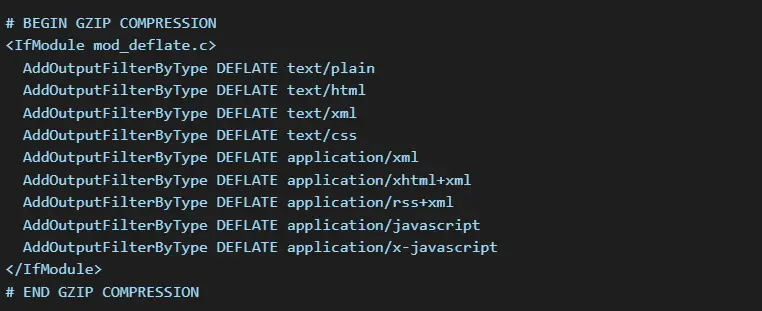
20. Turn on GZIP compression
This shrinks the files on your page before sending them to browsers.
This can be set up by your host or most caching apps. You can also put this code in your.htaccess file:
Last Thoughts
It doesn’t have to be hard to make your WordPress faster. Small changes can make a big difference in how well something works. Keep an eye on your site, stay up to date, and always put the user experience first. Don’t worry too much about getting perfect scores; instead, focus on how well it works in the real world.
Need More Help?
👉 Visit us at Preet Web Vision
📧 Email: hello@preetwebvision.com
📞 Phone: +63-9633112000
🎥 Follow us on our YouTube channels: